|
USB INTERFACE BOX AND PADS ***Please note that if you have Windows 7,8 or 10 running on a 64bit computer, you must first connect to the Internet before connecting the USB Interface box. A special driver may be required.
The USB Interface Box requires a USB driver to be loaded. This happens automatically when you start your computer and then connect the USB Interface box. Please be patient as it may take
a minute or more for the driver to load. Once loaded, start QuizMachine. Go to setup, hardware tab. Change the setting from Lpt1 Interface to QuizMachine USB Qbox. QuizMachine should
display a window that indicates the USB Box is Disconnected. Then almost immediately, another window should be displayed indicating that the USB Box is now Connected. No external
electrical power should be required.
Trouble getting USB Interface Box to recognize pads
1. Suggest connecting to the Internet, if possible, before starting this process.
2. Some USB cables that have been bad. Try another if you have one first. The cable is the same type that you would use for a USB printer.
3. It does take some time for the drivers to install. If you are using Windows 7,8 or 10 or Vista, you should see pop-up windows indicating the progress of the installation.
4. If you are using the Windows 7 operating system, make sure you are using version 5 (any level) of QuizMachine. To check which version you are using, follow these instructions (if
not, go to step 6):
a. Start QuizMachine (not QMServer)
b. Click the Setup/Exit button on the bottom left hand side of the screen
c. Click yes to change the setup
d. The QuizMachine Properties screen is displayed with the version listed in the middle of the screen
5. If the version is not 5 or 4.1.x (where x is a combination of a letter and a number) you need to upgrade to version 4 or 5. Go to www.quizstuff.com/downloads.htm and download and install
version 4 or 5 (make sure you exit QuizMachine before trying to upgrade).
6. If you upgraded, restart QuizMachine and plug in the USB interface box, making sure you receive a message that the USB box is now connected. You may see a loading device driver in a
lower right hand corner of the screen and a single beep, then after a few seconds 3 beeps and a device driver loaded when connecting the USB interface box.
7. The pads should be recognized.
8. If you already have version 4, then it could be that the USB driver was not loaded properly. Follow the next few steps.
9. First, with QuizMachine running and at least 1 set of pads plugged in, go back to the QuizMachine Properties screen (follow steps 1a-1d again). There is another entry showing
BogoLoops. If the number is -1, the driver definitely did not load properly. If it shows a large positive number then the driver should have been loaded but possibly the system did
not recognize it when it was loaded.
10. The check the hardware status, with QuizMachine running and the interface box plugged in, follow these steps:
a. Click the Windows start button (lower left hand corner of your Windows bottom menu)
b. Click control panel
c. Click system
d. Click device manager
e. Expand the Ports (COM & LPT) entry
f. You should see an entry for USB Serial port (COMxx)
g. If that entry does not show or has a yellow icon, the driver did not load properly
(the first time it was connected to the computer).
11. At this point you have 2 options.
a. Remove QuizMachine from your computer. Disconnect the USB interface box. If possible, connect to the Internet (we have found that some computers require a link to some
portion of Microsoft to successfully load the driver) and re-install QuizMachine (the last step of the install is the driver load). Start QuizMachine and connect the USB
interface box. QuizMachine should recognize the box (Qbox connected) and the pads should work.
b. Manually update the driver.
i. Make sure to do this when QuizMachine is not running.
ii. The drivers can be loaded manually by right clicking on the entry that has the yellow icon and clicking update driver software (you need to go back to the control panel
and device manager; see step 7 above).
i. You would then point to this folder on the laptop to find the driver information: c:\program files (x86)\quizstuff\QuizMachine5\lib\drivers\arduino\FTDI USB Drivers\.
ii. The driver should be updated.
iii. Start QuizMachine and see if it loads properly and finds the box.
QUIZMACHINE VERSIONS NEWEST PRODUCTION VERSION, version 5 (Windows XP, Vista and Windows 7 with or without a parallel port; the only version that works with the old USB Interface Box and WindowsXP, 7,8 or 10): version 4.2.d32 (October 2013) (download - it is a free 30 day trial, also)
(download - it is a free 30 day trial, also)
SOME COMMON ISSUES
Wireless networking
Please note that wired or wireless networking will dramatically affect
performance on computers running any Windows 98 operating system and files cannot be exported. It is not recommended to use any processor less than 1.8Ghz Core Duo or Windows XP SP3 Pro with to network with QMServer.
The program does not recognize any pads.
First, you can order new pads that are sewn on all 4 sides from us for $70 per string. See the store for more information.
These pads work with any version of QuizMachine
To use the USB Interface Box on Windows XP just connect the box and start QuizMachine. The drivers will be loaded automatically. For Windows 7, 8 or 10 make sure
the computer is connected to the Internet before attempting to use the USB Interface
Box the first time. It needs to obtain a special driver from a web site that is not
obvious. Not following these instructions will cause the Interface Box to fail.
In most cases a correction in the system setup can be accomplished by starting in the control panel.
1. Click Start
2. Click Settings then Control Panel (or just Control Panel depending on your OS)
3. Click System
4. Click Hardware
5. Click Device Manager. Expand the Ports (COM and LPT) selection
7. There should be a port listed such as COM1 when the box is connected
8. To start over, remove that device
9. Start the install process again (see notes above)
PRICING
See Store pages for details and pricing
|
OK, how does this all work? 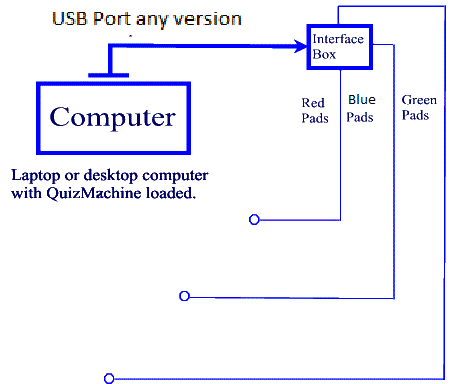
First, a laptop or desktop computer (we do have Dell laptops with
for a reasonable price) is needed. We do recommend
the USB Interface Box. Considering how most newer computers do not have a
a parallel port, a PCMCIA or Express (34mm or 44mm) port is needed for the
parallel Interface Box. See the notes below for specific computer requirements.
USB to Parallel converter cables (such as from Radio Shack) will not work so
so do not waste your time. Neither will serial to parallel cables.
The pads (see links for ordering the correct pads or new ones from QuizStuff)
connect to the interface box which the connects to the computer's USB or parallel
port. QuizMachine reads the data from the pads to determine which quizzer was
the first to jump.
QuizMachine not only determines which quizzer was first to jump, but also keeps
the score by quizzer and team. A printed score sheet is also available. Once a
round is complete a file can be created and loaded into QMServer and statistics
for all rooms, whether by a USB key or some networking scheme) is compiled
within a few minutes. QMServer produces reports for both individuals and teams.
These reports can be exported to a spreadsheet file and used in other programs is
desired. The points for teams can be calculated automatically using Olympic,
Modified Olympic or can be Win/Loss. The amount of points for the Olympic styles
can be configured (ie, 5 points for 1st, 3 for second and 1 for third). The type
used can also be selected, Olympic, Modified Olympic or W/L and can be different
from one tournament to another.
The free 30 day trial version may also be used for training and practice with QMServer. See the download section for the User Manual.
SUPPORTED OPERATING SYSTEMS We recommend using version 5 for any current operating system from
Windows XP SP3 through Windows 10. Linux nor any Apple iOS's are supported.
For version 4 or 5, we recommend:
- Any core-duo, duo core or better processor, 1.8ghz clock speed or greater. We have tested on lesser machines with some success, but the problems seem to be with slow video (the display is 1-3 seconds after the jump). Try slower processors at your own risk
- Minimum of 2GB of RAM or more (we have tested with less but the results are not always the best)
- 60Gb disk drive with at least 1Gb free
- Disk defragmentation run on a regular basis
- 1 WE DO NOT RECOMMEND using a Parallel port for the older interface box this seems to be a problem with the newer
laptops (see teksale.com or tigerdirect.com for some inexpensive
refurbished laptops);see other questions about the use of a parallel port in IBM Thinkpad computers or those that use Infrared (IR) ports.
- 1-2 USB ports for printer use
- A mouse
- A monitor port for projection use
- For older versions without QMServer active (networked; either wired or wireless):
Minimum operating system: Windows XP SP3 Pro up to Windows 10
LAPTOP COMPUTERS We have computers for sale. These are excellent for both
QuizMachine and personal use. Dell laptops are
recommended for QuizMachine as these brands and models
provide excellent processors.
Order Products
QuizMachine and QMServer were created for Nazarene style
bible quizzing. As time allows, we may be able to allow other
quizzing types.
|


